Cyber Agent, the sensor on your endpoints
A lightweight agent on PCs and servers: inventory, vulnerabilities, logins and critical events, with the threat detection and response typical of an XDR and real-time alerts.
The sensor that sits where things happen
Network scans see machines from the outside. The agent sees them from the inside: it sits on people's PCs and servers and collects what you need to know whether an endpoint is up to date, what is installed on it, who has logged in and what has gone wrong.
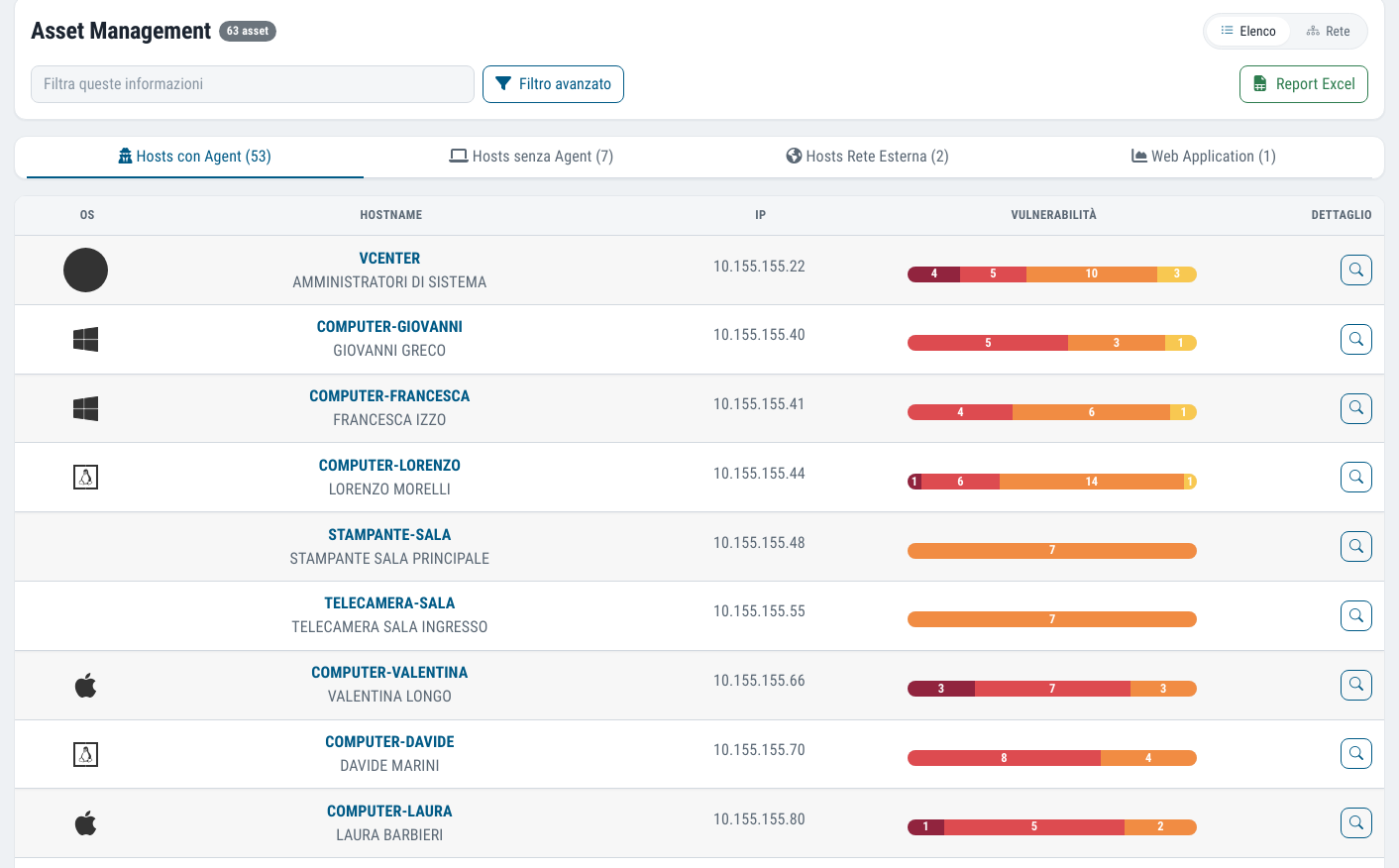
All of this reaches the portal together with the rest of the Dottor Box data, and it is the basis for other modules: Asset Management, the authorised software check and a large part of the access log.
In the contract documents, installing the Cyber Agent is the "SIEM agent implementation" item of the Security Monitor level: detection of suspicious activity, event correlation and configurable alerts.
When something serious happens you should not have to spot it by staring at a dashboard: an email arrives, in your language, already filtered by the rules you have set.
What you get
Vulnerabilities per machine
CVEs and missing patches host by host, so you know exactly which PC to update.
Software and logins
The program inventory and the logins feed the allowlist and the system administrators' log.
Emails on critical events
An immediate notification, with the event title in Italian or English.
Remote actions
Update a program, restart, shut down: from the browser, without another console.
Endpoint monitoring, point by point
These are the agent's functions and those assigned to it in the service specification.
The agent is available in two alternative variants, one SIEM-type and one RMM-type (remote management). Remote actions are available with the SIEM variant.
- Vulnerabilities per host with the related CVEs
- Installed software, hotfixes and system patches
- Network addresses and MAC addresses of the interfaces
- Endpoint access logs and local administrator users
- Critical security events and configuration checks
- File integrity monitoring, to detect unauthorised changes
- History of changes to the system registry and error logs
- Firewall logs and network connections
- HIDS (Host Intrusion Detection System) service with alerts
- Log centralisation for up to 6 months, to support forensic analysis
- Antivirus status, flagging unprotected PCs and servers
More than a SIEM: the Cyber Agent's XDR functions
A SIEM collects and retains events. An XDR (Extended Detection and Response) relates them to one another, recognises the behaviour of an attack and can react on the endpoint. The Cyber Agent does both.
Events read through MITRE ATT&CK
Each detection is mapped to the attack tactic and technique in the MITRE ATT&CK framework: you see not only "what happened" but which stage of an attack it belongs to.
Malware and rootkits
Known rootkit and trojan signatures, checks on hidden processes and files, comparison of file hashes against lists of indicators of compromise, and collection of alerts from the antivirus already installed.
Behaviour analysis
Correlation rules bring together events that look harmless on their own: repeated login attempts, a new administrator user, a system file modified straight afterwards.
Automatic response
On agreed rules the agent can act by itself, for example blocking on the local firewall the IP address attempting a brute-force attack, even just for a set time, after which the block is lifted.
Configuration against CIS benchmarks
Operating system settings are compared with hardening policies based on the CIS benchmarks: passwords, unnecessary services, system registry, with guidance on how to fix them.
Threat intelligence and threat hunting
Events are compared with threat intelligence sources, and the centralised history lets analysts actively search for traces of compromise that no alert has flagged yet.
Servers, cloud and containers. The same agent works on Windows, Linux and macOS, on virtual machines in the cloud and in container environments, so monitoring stays consistent wherever your workloads run. Which automatic responses to enable is decided together during activation: a block that triggers by itself should be a choice, not a surprise.
Three different rhythms, depending on what is needed
Not everything needs to be collected at the same frequency: alerts are immediate, the full inventory is periodic.
In real time
Critical alerts come from the agent as soon as they happen and immediately generate a "Critical Event Notification" email. The same applies to automatic response actions.
Every quarter of an hour
The portal updates the list of registered agents: a new machine appears within minutes.
Every week
The full collection of vulnerabilities, logs and software inventory runs at the end of the week; the antivirus status is checked on Monday morning.
Alerts that get read, not ignored
An alarm system that sends a hundred emails a day soon stops being read. That is why Cyber Agent alerts are designed to stay useful:
- the event title is in Italian or English, so even someone who is not a systems engineer can understand it;
- you can define exclusion rules by keyword and silence recurring noise you have already assessed;
- each recipient gets their own email, with no chains of CC copies.
Above the tools there is the work of people: false positive management for accurate notifications, correlation of security data and proactive hunting for hidden threats.
Which standards it supports
Log collection, file integrity, software inventory and the access log are technical measures required by many frameworks, including the order of the Garante (the Italian Data Protection Authority) on system administrators.
Frequently asked questions about the Cyber Agent
Does the Cyber Agent replace the antivirus?
No, it works alongside it. The agent checks the antivirus status on every PC and server, flags unprotected machines and collects antivirus alerts to relate them to other events. Protection remains whatever you already have installed.
Which operating systems does the Cyber Agent run on?
Windows, Linux and macOS, on both physical machines and virtual machines in the cloud and in container environments. For Linux there are rpm and deb packages, for amd64 and aarch64 architectures, and in the portal you will find the installation commands already filled in, ready to copy.
Does the agent slow computers down?
It is a lightweight agent: only critical events travel in real time, while the full collection of inventory, vulnerabilities and logs happens once a week. Installation may cause brief interruptions in the use of the connected resources, which is why it is planned during activation.
What is the difference between SIEM, EDR and XDR?
A SIEM collects and correlates logs from many sources. An EDR monitors and defends the individual endpoint. An XDR extends detection and response across several layers, bringing together endpoints, network and identities. You will find the comparison in the guide what is a SIEM and on the Managed SIEM and XDR service page.
Who reads the alerts generated by the agent?
It depends on the service level. With Security Monitor, alerts are emailed to your team. With MDR + SOC, alerts also go to Dottor Marc's SOC, which steps in to contain the threat, with ticket support during working hours; with MDR + SOC 24/7, cover is continuous. SOC and MDR: the three levels.
How long are logs retained?
The Cyber Agent centralises logs for up to 6 months. That window lets you reconstruct an incident even weeks later, and it matches the minimum retention period that the Garante requires for system administrators' access logs. Access logs and system administrators.
Often activated together
Asset Management
A single IT inventory of devices and software, with a graph map of the network.
Learn more SeeAccess logs
System administrator logins collected and retained as the Italian Data Protection Authority requires.
Learn more SeeAuthorised software
Installed software compared with the approved list, to find what should not be there.
Learn moreDo you know what someone looking for a target can see of your company?
In a demo on your real systems we show you what is exposed, how much it matters and where to start. Then, if you need it, a tailored proposal.