Open shares
Which network folders can be reached, by whom and with what permissions. The on-site probe checks by actually trying to get in.
The folder shared "just for a moment" is still there
A folder shared ten years ago to pass a file to a colleague is still on the server, and the payslips are inside it. It happens in almost every company, and almost always nobody knows.
The open shares check looks for all the network shares (SMB) on the internal network and tries to access each one, as malware moving through the network would: first without credentials, as an anonymous or guest user, then with an authenticated account. For each attempt it records whether it gets read access, write access or nothing.
The result tells you what data is available to anyone with access to the company network, including a guest on the wi-fi or a compromised device. It is one of the six checks in the Vulnerability Assessment.
What you need to set up. The Cyber Drill probe installed on site, the same one that runs the internal network scan. It finds the shares by itself: you do not have to list them.
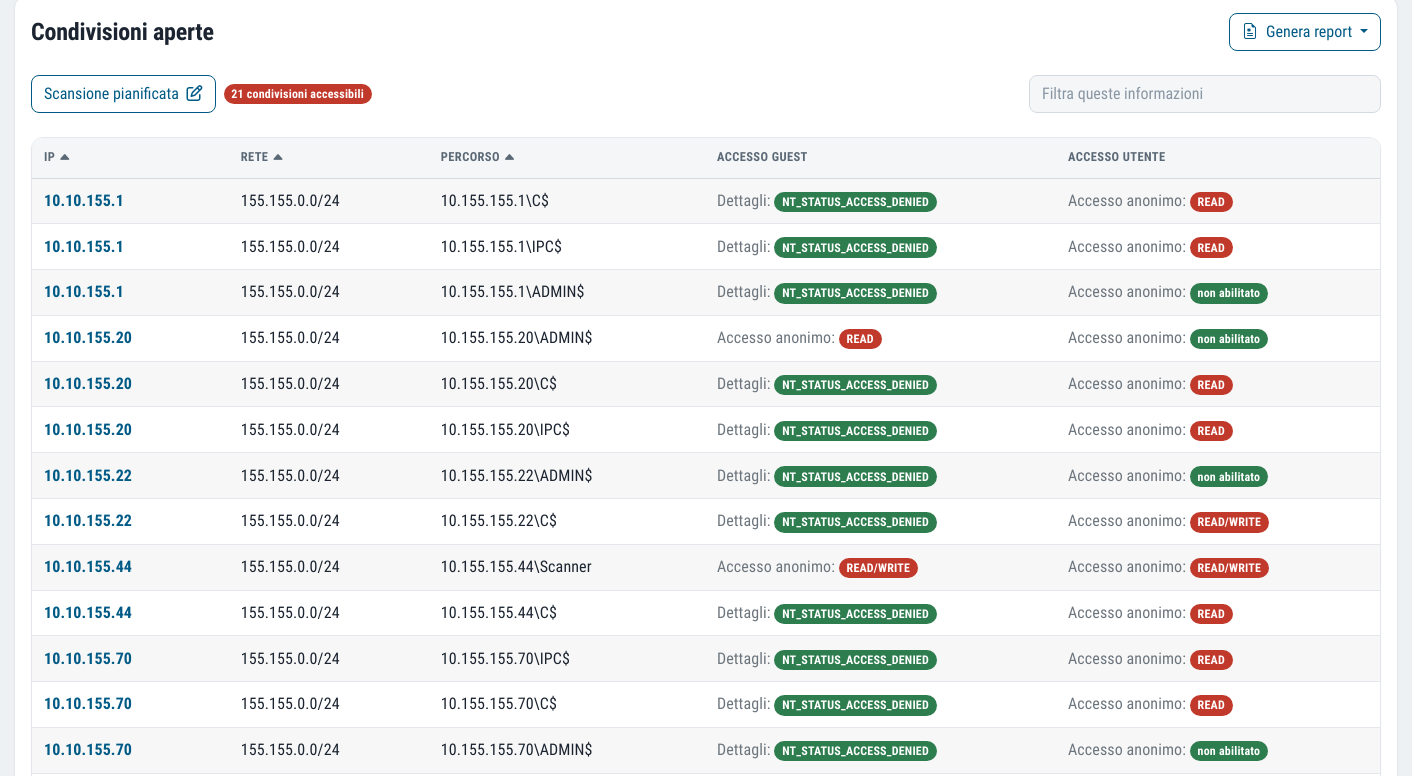
What you get
Every share
The list of shared folders found on the network, organised host by host.
Two access tests
For each one, the result as an anonymous user and as an authenticated user: read, write or no access.
Critical shares highlighted
A count of critical shares, those open to anyone who connects to the network.
No configuration
The probe finds the shares without you having to provide a list.
Ransomware and lateral movement
The risk is not the folder itself: it is what the folder makes possible. Unprotected or poorly managed shared directories are a way in for attackers and make it easier for ransomware to spread, encrypting everything it can write to.
They are also the route for lateral movement: the attacker moves from one system to another, staying hidden while looking for sensitive data to steal. A folder that an anonymous user can write to is, for them, an open road.
Unprotected or poorly managed shared directories can act as entry points for attackers, making it easier for ransomware to spread.
How to read the shares report
The probe searches
The Cyber Drill identifies the hosts on the internal network that expose SMB shares.
It tries to get in
For each share it attempts access as an anonymous user and as an authenticated user, and notes what it manages to do.
You read the results
The report is organised by IP address, with the two results shown as badges and the count of critical shares.
Fix the permissions
Close anonymous access, restrict write access, remove forgotten shares. At the next round you check the result.
The questions it answers
- Which folders can anyone connected to the network read?
- Which folders can be written to without credentials?
- Which shares can any authenticated user access, even though they should not?
- Which servers expose shares that nobody uses any more?
It is one of the checks that surprises people most on the first round: folders open to anyone who connects to the network are almost always there, and almost always unsuspected.
The questions we are asked most often
Why test with an authenticated user too?
Because many folders are closed to anonymous users but open to any employee. If a single account is compromised, everything that account can read or write is within the attacker's reach.
Is a check separate from the internal network scan needed?
The two complement each other. The internal network scan looks for vulnerabilities in services; this check verifies who can access shared data. They use the same on-site probe.
Which standards it supports
Control of access to data is required by every information protection standard: this report is the technical evidence for it.
The other checks from the same probe
Vulnerability Assessment
Six checks from inside and outside, with CVSS severity, history and alerts on what is new.
Learn more SeeInternal network
Your LAN scanned by the on-site probe, the way malware that is already inside would see it.
Learn more SeeCyber Drill
The probe installed on site that analyses your internal network. No firewall ports to open.
Learn moreDo you know what someone looking for a target can see of your company?
In a demo on your real systems we show you what is exposed, how much it matters and where to start. Then, if you need it, a tailored proposal.