Time Machine
Six months of your security history in a calendar, with archived reports to download month by month.
Proving that monitoring has been continuous
Proving that you have monitored continuously is often harder than monitoring. At an audit it is not enough to say that the scans run: you have to show when they ran, which checks, with what results.
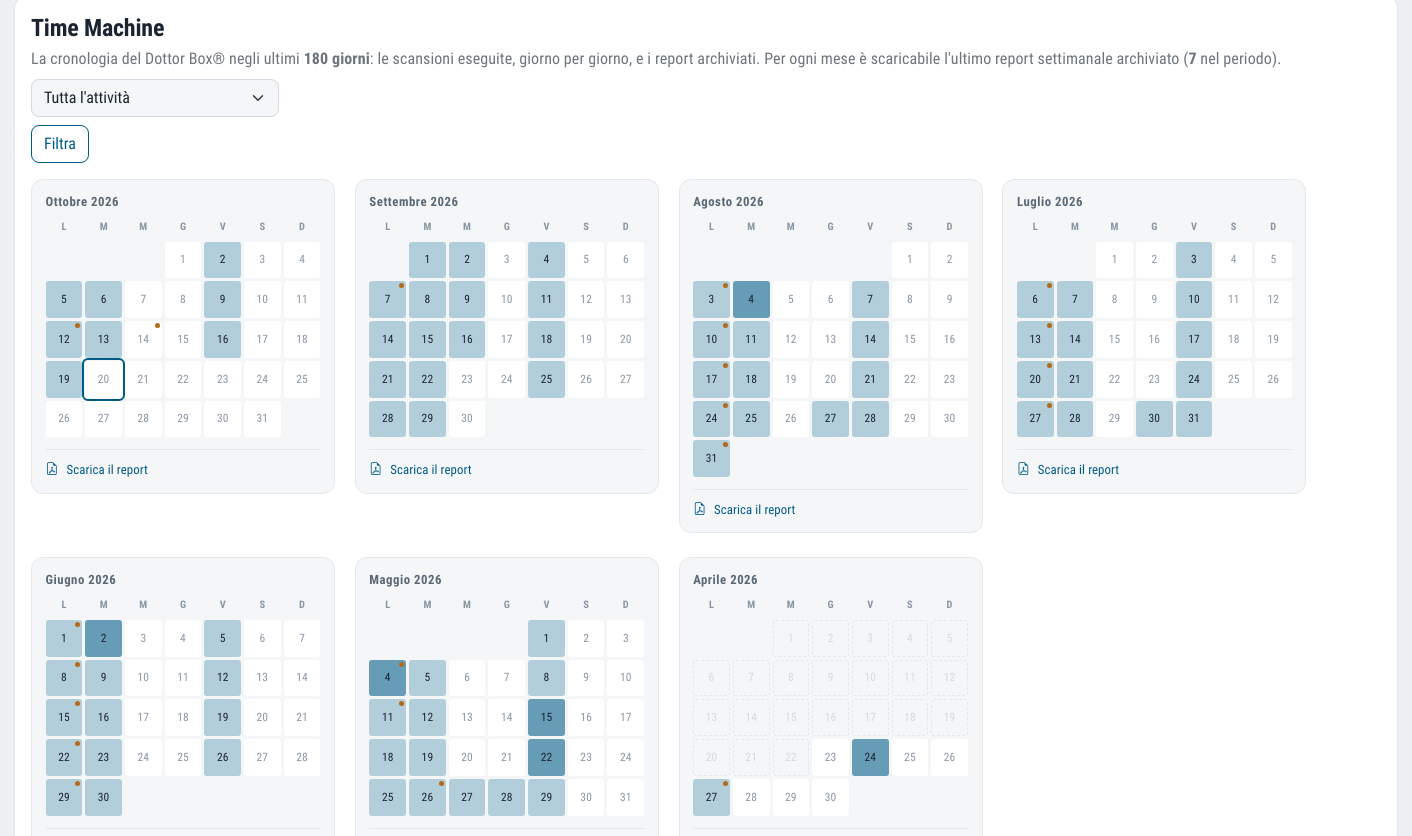
The Time Machine tells the story of your Dottor Box in a grid calendar: one month per panel, most recent first, covering the last 180 days. Each square is a day, and the colour gets deeper the more types of scan were run.
Hovering over a day shows which checks were run and how many reports were archived; a dot marks the days with a report. A filter by type shows only the checks active on your contract.
What you get
The calendar of checks
Day by day, which checks were run: at a glance, without opening a report.
No hidden gaps
Months with no activity stay visible, because a gap in coverage is something you need to know about.
Archived reports
For each month you download the latest weekly technical report kept, in full.
Comparison between periods
Documentary proof that your security posture has improved since you started.
From the scanner to the calendar, with no manual steps
The history builds itself: you do not have to export, save or rename anything.
The checks run
Scans follow the configured frequency, and the contractual service level is the minimum commitment.
The archive records
Every completed run goes into the scan archives, with its date.
The report is kept
Every Wednesday night the platform generates the technical report for each active customer and archives it in the history.
You view and download
The calendar shows the history of the last six months and, month by month, the report to download.
An empty month is information
It would have been easy to show only the months with activity: the calendar would have looked fuller. We chose the opposite. If nothing ran in a month, the panel is there and it is empty, because a gap in coverage is exactly what you need to know, before an auditor finds it.
In the same way, the dates in the calendar come from the scan archives, that is from what was actually run, not from the job queues. A check that was scheduled but not completed does not appear as done.
The Time Machine shows what happened, not what should have happened.
A detail auditors appreciate
At audits and at renewal
- At an audit, when you are asked for evidence of monitoring over time and not just the latest snapshot
- At renewal or in a management meeting, to show what has changed since you started
- After an incident, to reconstruct which checks were active in the days before
- With a customer whose supplier questionnaire asks for proof of continuous monitoring
How to activate it. The Time Machine is part of Reporting: it is activated together with report generation and keeps its history.
Which standards it supports
The standards require continuous monitoring and proof that it has been continuous.
Often activated together
Reporting
Executive, technical and presentation reports with editable charts, generated automatically too.
Learn more ProveCyber Risk Report
The periodic report in PDF, presentation and Excel, with the chapters you choose.
Learn more SeeVulnerability Assessment
Six checks from inside and outside, with CVSS severity, history and alerts on what is new.
Learn moreDo you know what someone looking for a target can see of your company?
In a demo on your real systems we show you what is exposed, how much it matters and where to start. Then, if you need it, a tailored proposal.