Internal network vulnerability assessment
What an attacker who is already inside would see: servers, workstations, printers, network devices. You find out with a probe installed at your premises.
The real question: what can someone who is already in do?
The perimeter stopped being enough a long time ago. A stolen password, an opened attachment, an infected laptop plugged in at the office: the attacker is inside, and from there looks for the next vulnerable system. An internal network scan answers that question, and keeps asking it over time.
The analysis starts from the Cyber Drill probe installed in your network and looks at everything connected to the LAN: PCs, servers, switches, routers, firewalls, multifunction printers, IoT devices. It simulates a disloyal employee or malware that has already got past the perimeter defences.
It is one of the six checks in Dottor Box's Vulnerability Assessment, and the natural complement to the external network scan.
What you need to set up. The Cyber Drill probe on site, connected to the network to be analysed, and your subnets listed in the Attack Surface. Nothing needs to be installed on individual workstations.
What you get
Scanning from the inside
A professional vulnerability scanner, run by the probe inside your network: it sees what an attacker who is already in would see.
Severity and CVEs
Vulnerabilities by host and by port, with CVSS severity, CVE identifiers and descriptions in Italian and English.
History per subnet
You can scan one part at a time without losing the comparison with the previous round.
Exclusions that stick
Exclude IP addresses, ports or MAC addresses once: the exclusions also apply to later scans.
From the probe to a clear report
List your networks
You specify the subnets to check and any exclusions by IP address, port and MAC address.
The probe scans
The Cyber Drill runs more than 130,000 network vulnerability tests (NVTs), from a database updated every day.
The results are enriched
The results reach the portal, are linked to CVEs and described in Italian and English.
We tell you what is new
When a scan is complete you receive an email listing the vulnerabilities that are new since the previous round.
Networks, severities, progress
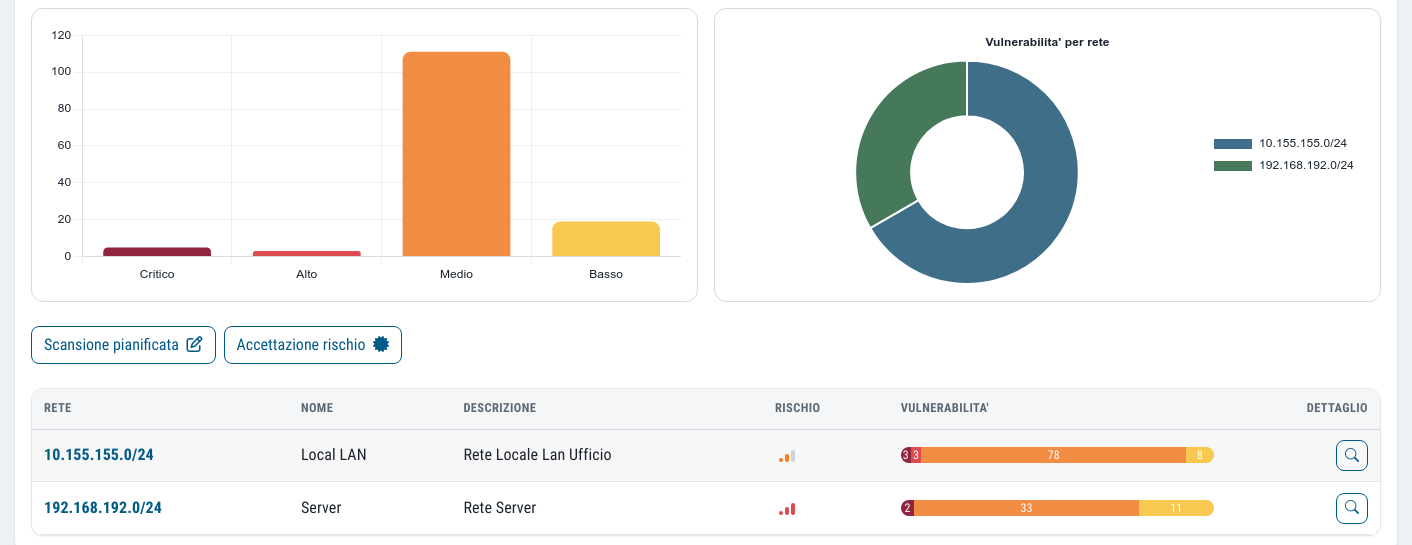
- The list of registered networks, with the distribution of vulnerabilities by severity
- A chart by band: critical, high, medium, low
- The ten most affected networks, so you know where to start
- The progress percentage of the scan under way
- Scheduling, and an immediate manual start
- The detail of every vulnerability, host by host and port by port

History is kept per subnet, not per scan
In many companies scanning the whole network in one go is not practical: different sites, maintenance windows, production networks that need careful handling. Dottor Box versions the results for each individual network (CIDR). You can upload partial scans of different subnets at different times, and the history stays consistent.
The new-vulnerabilities email is sent only when the scan is 100% complete: no alarms based on half the data.
When the scan runs
The frequency is configurable: choose the days, months and time, and you can always start a scan straight away. The contractual service level is the minimum commitment, and the benchmark stated in the report is a weekly scan.
Scans are non-invasive and are complemented by manual checks by qualified staff, to remove false positives and false negatives. A finding that has been reviewed and accepted stays visible but no longer counts towards the total.
The questions we are asked most often
What is the difference between an internal and an external scan?
The external scan starts from the internet and sees only what is published, like an outside attacker. The internal scan starts from the probe on site and sees everything connected to the LAN, like malware or a user who is already inside. You need both, because the vulnerabilities are not the same.
Does the scan slow down the network or block systems?
Scans are non-invasive and you can schedule them at the times you prefer, for example at night or at the weekend. Sensitive devices can be excluded by IP address, port or MAC address.
Can I scan just part of the network?
Yes. History is kept for each individual subnet, so you can proceed in stages, one site or segment at a time, without losing the comparison with previous rounds.
Which standards it supports
Technical vulnerability management is required by every major framework: regular LAN scans are the evidence.
The other checks from the same probe
Vulnerability Assessment
Six checks from inside and outside, with CVSS severity, history and alerts on what is new.
Learn more SeeOpen shares
Network folders that the wrong people can read or write: ransomware's favourite route.
Learn more SeeCyber Drill
The probe installed on site that analyses your internal network. No firewall ports to open.
Learn moreDo you know what someone looking for a target can see of your company?
In a demo on your real systems we show you what is exposed, how much it matters and where to start. Then, if you need it, a tailored proposal.