Access logs and system administrators
The access register required by the Italian Garante's order, collected in three ways, from endpoints, from Microsoft 365 and from Google Workspace, with no manual work.
Who accesses your systems, and when
The order on system administrators issued by the Garante (the Italian Data Protection Authority), published in the Gazzetta Ufficiale no. 300 of 24 December 2008, requires data controllers to record the logical access of those who administer systems, networks and databases, and to keep a trace of it.
It applies to practically every company in Italy, because system administrators can be internal or external: the IT provider, the consultant, the software house that connects remotely. They have privileged access to data, and logging is there precisely to monitor what they do.
Dottor Box collects logins in three ways: from endpoints, with the Cyber Agent acting as a SIEM, and from the Microsoft 365 and Google Workspace cloud environments. Everything ends up in the same register, which can be searched and exported. It is one of the six checks in the Vulnerability Assessment.
What you need to set up. For endpoints, the Cyber Agent on the PCs and servers to be checked. For the cloud, the read-only connection of the Microsoft Entra ID module and/or the Google Workspace module. You can activate one, two or all three sources.
What you get
A single register
Logins to endpoints, Microsoft 365 and Google Workspace in the same place, searchable.
Who the administrators are
The declared list of system administrators, internal and external, alongside their logins.
Full CSV export
The register ready to attach as evidence at an audit or during an inspection.
Alerts on unusual access
Repeated attempts, sign-ins from new countries, logins with administrative accounts.
Three sources, a single register
1. Endpoints, with the Cyber Agent as SIEM
The agent installed on PCs and servers centralises the access logs, like a SIEM. For each login we record user, workstation, IP address, domain, host, outcome, whether the account is administrative, date and time.
The register can run to hundreds of thousands of rows: that is why you consult it by starting from a search, with results paged from the most recent.
2. Microsoft 365, through Entra ID
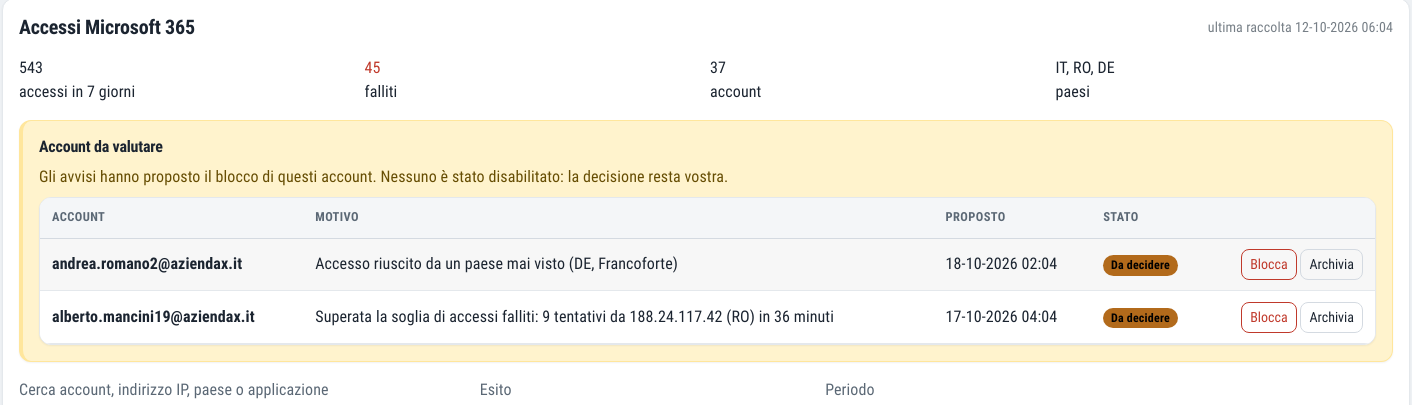
A summary of sign-ins to the tenant, filters by outcome and period, and the alerts: failed attempts above a threshold, a successful sign-in from a country never seen before, a sign-in by an administrative account.
These alerts can give rise to a proposal to block the account.
3. Google Workspace
If your company works with Google, sign-ins to Google Workspace accounts go into the same register, alongside those from workstations.
The connection to the domain is read-only, the same one used to check the Google Workspace configuration.
A person decides whether to block the account
When an alert justifies it, the platform proposes blocking the Microsoft account involved. The account is disabled only when a person confirms it. Never automatically.
This is not a limitation, it is a design choice. If the block were triggered by failed attempts alone, anyone who knows your company's email addresses could lock your employees out at will, simply by getting the password wrong several times. A defence system would become a tool for disruption in the hands of an attacker.
A burst of failed attempts, a successful sign-in from abroad, a login with an administrative account: the platform alerts you and proposes the block. The decision always stays with a person.
How Dottor Box alerts work
What it helps you demonstrate
If you have taken on the obligations for system administrators, you need to be able to show who they are, what they have done and that someone checks it.
- The list of system administrators by name
- The recording of logical access, with date, time and outcome
- The distinction between administrative and ordinary accounts
- Microsoft and Google cloud sign-ins alongside those on workstations
- A full export to hand over at an audit
- Alerts that show active control, not just an archive
Frequently asked questions about system administrator logs
Does the Cyber Agent also record logins by external administrators?
Yes, it records logins to the workstations and servers on which it is installed, whoever carries them out: employees, the IT provider or external consultants.
Can I hand over the register during an inspection?
Yes. The CSV export contains the complete register and can be attached as evidence, together with the declared list of system administrators.
Why is account blocking not automatic?
Because an automatic block on failed attempts could be triggered by anyone who knows a company email address. The platform alerts you and prepares the proposal; confirmation always comes from a person.
Who counts as a system administrator according to the Garante?
Anyone who manages and maintains computer systems or their components and, by extension, anyone who administers databases, networks, security devices and complex software. They can be an employee or an external supplier; they must be designated individually and the list must be kept up to date. Find out more in the guide to system administrator logs.
How long must system administrator logs be kept?
The order requires logical access records to be kept for at least six months, complete, unalterable and with the possibility of verifying their integrity. The Cyber Agent centralises logs for up to 6 months; to keep them for longer you can periodically archive the CSV export.
How often should the work of system administrators be reviewed?
The order requires the controller to carry out a review at least once a year, to check that the administrators' activities comply with the organisational, technical and security measures in place. The searchable register and the alerts on unusual access are the material on which to base it.
Which standards it supports
Beyond the Garante's order, recording and reviewing privileged access is required by every major framework.
Often activated together
Cyber Agent
The endpoint agent: security events, file integrity and clear, readable alerts.
Learn more SeeMicrosoft Entra ID
The security posture of your Microsoft 365 tenant across 72 indicators, read-only.
Learn more SeeGoogle Workspace
35 checks from the CIS benchmark on your Google Workspace configuration, email included.
Learn moreDo you know what someone looking for a target can see of your company?
In a demo on your real systems we show you what is exposed, how much it matters and where to start. Then, if you need it, a tailored proposal.