Records of processing
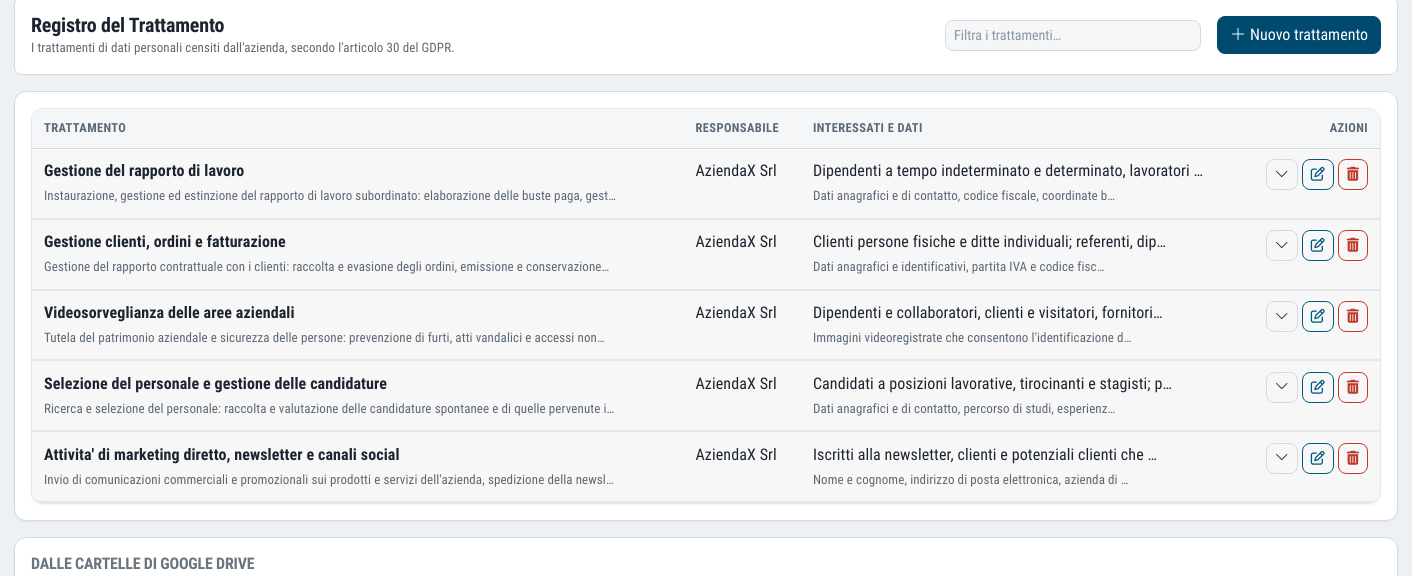
The GDPR Article 30 register, with processing activities the platform suggests on its own by reading the structure of your Drive, never the content of the files.
Records of processing that do not stay frozen on day one
The record of processing activities is mandatory, and in most companies it is a file filled in once and never opened again. In the meantime, new folders, new processes and new personal data appear.
In Dottor Box the fields are those of Article 30 of the GDPR, in the order of the regulation. And the platform helps you fill it in: by analysing the structure of your Google Drive, that is the folder names and not the documents, it suggests the processing activities it recognises and leaves them as a draft to confirm.
It also flags data kept in breach of the rules: CVs kept too long, identity cards, payslips that ended up in someone's personal space.
Metadata only: the platform never reads the content of your files.
What you get
The 24 fields of Article 30
Grouped into sections in the order of the article, with owners chosen from the company directory.
Suggested processing activities
The Google Drive scan recognises processing activities from folder names and suggests them as a draft.
Retention findings
CVs that are too old, identity documents, payslips and health records in the wrong places.
Metadata only
Folder names and structure, never the content of the documents.
The sections of the register, in the order of the regulation
If you have already filled in a GDPR record of processing activities, you will find the same Article 30 layout. If it is your first time, you follow the regulation without having to keep it open alongside.
The owners of each processing activity are chosen from the response team directory, the same one used by the Risk Assessment and the Compliance module.
- Controller and organisation
- The processing activity
- Data and recipients
- Legal bases
- Retention
- Impact assessment
Two automations a Word template does not have
The Google Drive scan
It reads only the metadata and suggests the processing activities recognised from folder names. It works in stages: on large archives it can even take days, with progress visible on the page.
The draft to confirm
Suggested rows are marked as a draft. You confirm, correct or discard them: you decide what goes into the register.
The data to check
The platform lists the retention findings, each with the reason and the suggested remedy.
What you have written by hand is never overwritten
Running the scan again updates the suggestions, but never touches a row written by hand. You can run it again whenever the Drive changes without worrying about losing the work already done.
It is the right rule for a document with legal weight: the automation suggests, the decision stays with whoever is accountable for the processing.
- CVs kept for more than 24 months
- Identity documents
- Payslips in personal spaces
- Health records
These are the cases that cost dearly in an inspection by the Garante (the Italian Data Protection Authority), and the ones nobody looks for until someone else finds them.
Questions about the records of processing
Who has to keep records of processing?
Article 30 of the GDPR requires it of the controller and the processor. The exemptions for organisations with fewer than 250 employees are narrow: they do not apply if the processing is not occasional or involves special categories of data, such as employees' health data.
Does the Google Drive scan read my documents?
No. It reads only the metadata, that is the names and structure of the folders. The content of the files is never opened.
How long does the scan take?
It depends on the size of the archive. It works in stages and on very large archives it can even take days; progress is visible on the page and you can work on the register in the meantime.
Do the records of processing have to be sent to the Garante?
No. They must be kept in writing, including in electronic form, and made available to the Garante when it asks for them, for example during an inspection. That is why it matters that they are up to date and available for consultation at any time. The other GDPR obligations.
How often should the records of processing be updated?
There is no fixed deadline: they must be updated whenever a processing activity starts, changes or ends, for example with new software, a new supplier or a new purpose. The Garante regards the register as a tool to be kept constantly up to date, not a document to fill in once.
Which standards it supports
The register is a direct GDPR obligation and, through the Compliance module, also becomes evidence for the standards on protecting personal data in the cloud.
Often activated together
GDPR forms
Appointments, privacy notices and authorisation letters for all your staff, generated in one step.
Learn more SeeGoogle Workspace
35 checks from the CIS benchmark on your Google Workspace configuration, email included.
Learn more GovernIncident Response and Data Breach
CSIRT, incident handling phases and a breach register with notification deadlines.
Learn moreDo you know what someone looking for a target can see of your company?
In a demo on your real systems we show you what is exposed, how much it matters and where to start. Then, if you need it, a tailored proposal.