Authorised software
What is installed on your machines, what you have authorised and what should not be there. The inventory comes from the agents, the control is in your hands.
An inventory of authorised software, without spreadsheets
Knowing what is installed on workstations is one of the basic controls every standard asks for, and one of the most tedious to keep up to date by hand. The result is usually a list compiled once and never read again.
Here the inventory arrives by itself, from the agents installed on the machines. You declare once what is authorised and from then on you receive a notification only when something new appears. It is the spirit of the CIS control on the inventory of authorised software, applied continuously.
It is one of the six checks in the Vulnerability Assessment and looks inside individual workstations, where network scans cannot reach.
What you need to set up. The Cyber Agent on workstations and servers: it is the agent that collects the list of installed programs. The check is always active and fills up as the agents are installed. The same agent feeds the access log.
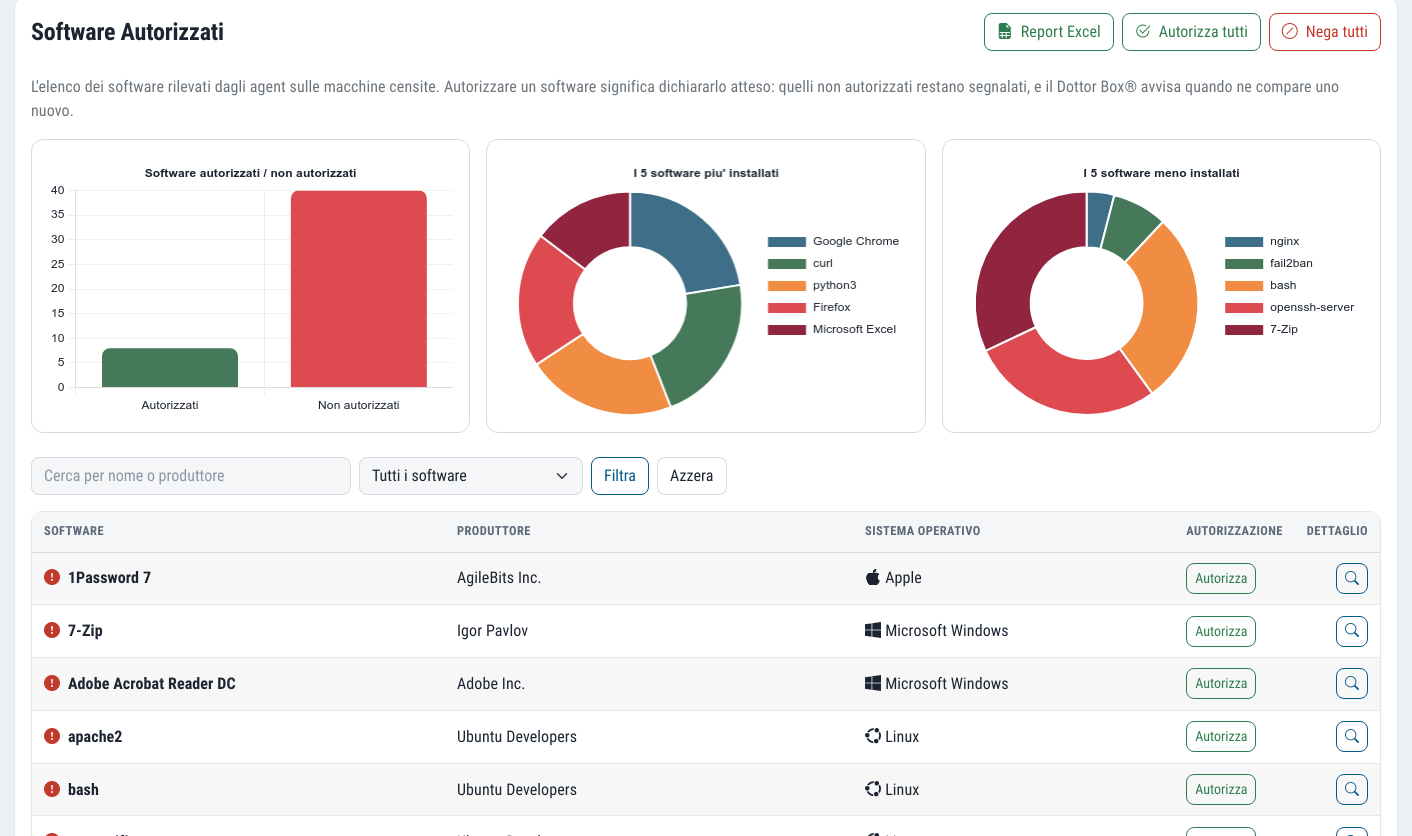
What you get
Software by name
The inventory works by program, not by individual installation: you see how many machines it is on.
A baseline in one click
You authorise in bulk what is there today and from then on you check only what is new.
Suspicious tools flagged
The platform recognises the executables that malware uses to move through the network.
Email on what is new
An alert when a new application appears on your machines.
From inventory to baseline
The agents collect
The Cyber Agent sends the list of packages installed on each machine.
The list is normalised
Each piece of software appears once, with a normalised name, operating system and number of machines it is on.
Set the baseline
Authorise or deny items one by one, or authorise everything to start from the current state. A record is kept of who authorised what.
Check what is new
When the inventory finds a new application you receive an email and decide whether to authorise it.
The tools attackers find already installed
Many attacks do not install anything new. They use legitimate Windows programs, already present on every machine, to download files, run commands on other computers, schedule tasks or change the network configuration. The technique is called living off the land, and it easily goes unnoticed precisely because those programs are "normal".
Dottor Box automatically marks these executables as suspicious, together with the names of known malware, when they are not authorised. If you really need them you authorise them, knowingly; if not, you know where to look.
What gets flagged
- certutil.exe, used to download and decode files
- psexec, to run commands on other machines on the network
- schtasks.exe, to schedule tasks that survive a reboot
- netsh.exe, to change the network and firewall configuration
- Names of known malware found in the inventory
The questions we are asked most often
Where does the software list come from?
From the package inventory collected by the Cyber Agent on each machine. You do not have to fill anything in: the list updates itself as the agents send their data, and for each piece of software you see the operating system and the number of installations.
If I authorise everything at the start, do I lose control?
Authorising everything serves to set the baseline: the starting point. From then on every new application is flagged to you. Suspicious tools stay highlighted in any case until you authorise them individually and knowingly.
Can I deny software that is already installed?
Yes. You can authorise or deny each program, or deny everything that is not in the baseline. Removing it from the machines remains a task to carry out with your IT team.
Which standards it supports
Inventory and control of authorised software are among the first security controls in almost every framework.
Often activated together
Vulnerability Assessment
Six checks from inside and outside, with CVSS severity, history and alerts on what is new.
Learn more SeeCyber Agent
The endpoint agent: security events, file integrity and clear, readable alerts.
Learn more SeeAsset Management
A single IT inventory of devices and software, with a graph map of the network.
Learn moreDo you know what someone looking for a target can see of your company?
In a demo on your real systems we show you what is exposed, how much it matters and where to start. Then, if you need it, a tailored proposal.