Microsoft Entra ID, the security posture of your tenant
72 checks on your Microsoft 365 tenant, every week, read-only. A score and a grade you can compare over time.
Microsoft 365 security is not "managed by Microsoft"
Microsoft 365 holds the email, files and identities of your whole company. It is the most lucrative target for an attacker and, often, the most neglected: Microsoft looks after the infrastructure, but the configuration of the tenant is your responsibility.
Dottor Box reads the configuration of Microsoft Entra ID (formerly Azure Active Directory) and compares it against 72 indicators: who has administrative privileges, who really has two-step verification turned on, which third-party applications can read email, which automatic forwarding rules have appeared since last time.
The result is a score with a letter grade, the detail of every indicator with the objects that make it fail, and a PDF report to attach to your evidence.
The application you register in your tenant has read-only permissions: Dottor Box can see how Microsoft 365 is configured, it cannot change it.
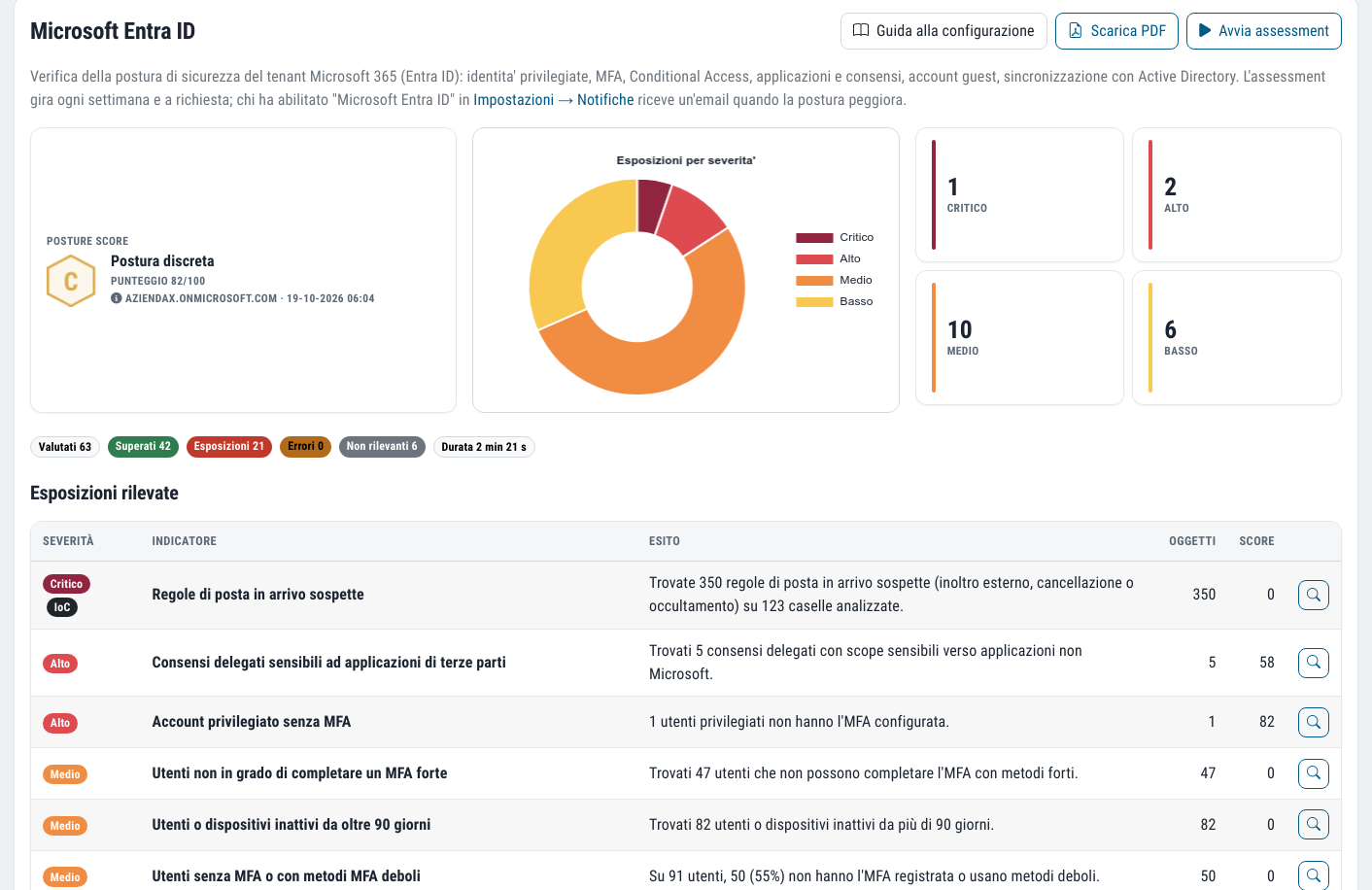
What you get
A grade you can compare
A score and letter grade for the security of your cloud identities, to follow week after week.
The exposures that matter
Privileged accounts without MFA, risky OAuth consents, suspicious mail rules, forgotten guests.
Sign-in log
Alerts on failed attempts, sign-ins from new countries and logins with administrative accounts.
Read-only
The app you install cannot change anything in your tenant. The secret is encrypted and never appears in the logs.
72 checks on your Entra ID configuration
The indicators cover the areas where almost all Microsoft 365 incidents take root.
- Privileged identities: who has administrative roles and how they are protected
- Multi-factor authentication (MFA), user by user
- Conditional Access, the policies that decide who gets in and from where
- Applications and OAuth consents, including those that grant access to email
- Guest accounts still active after a collaboration has ended
- Synchronisation with on-premises Active Directory
- Suspicious mail rules, such as automatic forwarding to outside addresses
- Application credentials: secrets and certificates of registered apps
From activation to the first report
Activation is guided step by step: we do not leave you alone in front of the Azure portal.
Register an application
The in-product guide walks you through creating the app in your tenant, assigning the read permissions and the client secret. If you prefer, there is also a PowerShell script that does it all for you.
Enter the credentials
Tenant ID, Client ID and secret go in the settings. When you save, the credentials are checked straight away and you see which permissions are missing.
The check runs every week
The assessment starts every Monday morning, and you can run it whenever you like with one click. If the posture gets worse, you receive an email.
Acceptances that lapse on their own
Not every finding is a mistake. An emergency account without MFA, an application with broad permissions that you actually need: when an object has been reviewed and knowingly accepted you mark it as "All OK", with the reason. It stays visible, but no longer counts against the score.
The acceptance applies to that configuration, not to that row. Dottor Box recognises each object by a fingerprint of its fields: if someone changes its configuration, the acceptance lapses and the finding is flagged again automatically. An exception approved a year ago does not cover a change made yesterday.
We propose the block, a person decides
The Microsoft 365 sign-in log collects interactive sign-ins every hour and generates alerts: bursts of failed attempts, a successful sign-in from a country never seen before, a login by an administrative account. These alerts give rise to a proposal to block the account.
The block is never automatic: it happens only when a person confirms it. This is a design choice. If it were triggered by failed attempts alone, anyone who knew your company's email addresses could lock your employees out at will, simply by getting the password wrong on purpose.
Which standards it supports
Identity management, multi-factor authentication and control of privileged access are required by every major framework. The Entra ID assessment documents them with data from the tenant, not with declarations.
Frequently asked questions about Microsoft Entra ID security
What is Microsoft Entra ID?
It is the Microsoft service that manages identities and access for Microsoft 365: users, groups, authentication and connected applications. Until 2023 it was called Azure Active Directory. Every company that uses Microsoft 365 has one, even if it has never deliberately configured it.
What permissions does Dottor Box have on my Microsoft 365 tenant?
Read permissions only, granted to an application that you register yourself and can revoke whenever you like. The only write action provided for, disabling an account after an alert, requires an additional permission that the assessment application does not have, and happens only when a person confirms it.
How do I check that multi-factor authentication is on for everyone?
From the Microsoft portal it is easy to miss someone: administrative accounts, service accounts, guests. Dottor Box checks MFA user by user, together with privileged roles and Conditional Access policies, and shows you the objects that do not meet the indicator. What multi-factor authentication is.
Does the Entra ID assessment help with NIS2?
Yes, as evidence. NIS2 requires access control and multi-factor authentication, and the GDPR requires appropriate technical measures: a report with a score and the detail of each indicator documents how the tenant is really configured. The PDF also lists acceptances with their reasons, and you can attach it to the evidence in the Compliance module.
I use both Microsoft 365 and Google Workspace: can I check both?
Yes. The Google Workspace module uses the same scoring method, so the two results can be compared. The checks run on different days, Monday for Microsoft and Tuesday for Google, and sign-ins from both end up in the same log.
Often activated together
Google Workspace
35 checks from the CIS benchmark on your Google Workspace configuration, email included.
Learn more SeeAccess logs
System administrator logins collected and retained as the Italian Data Protection Authority requires.
Learn more SeeDark Web Monitoring
Compromised company credentials and mentions of your brand on leak and ransomware sites.
Learn moreDo you know what someone looking for a target can see of your company?
In a demo on your real systems we show you what is exposed, how much it matters and where to start. Then, if you need it, a tailored proposal.