External network vulnerability assessment
Your perimeter as seen from the internet, with open ports and blacklists checked every day. You do not need to install anything.
Anything reachable from the internet is a way in
The perimeter changes more often than you might think: a firewall rule opened for a test and never closed, a service published for a supplier, a device replaced with its factory configuration. The external network scan looks at your public IP addresses from the point of view of an outside attacker, who can reach you only from the internet.
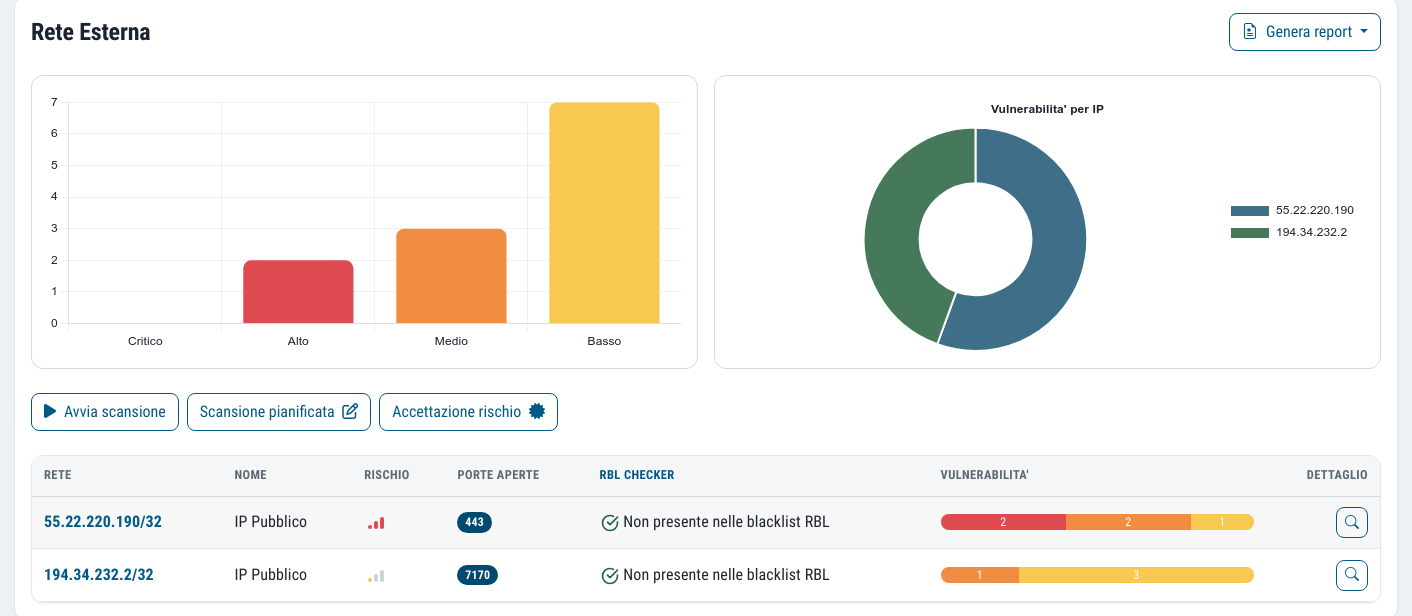
As well as vulnerabilities, every day it checks two things that are usually discovered late: which ports are open and whether your addresses have ended up on an email blacklist.
It is one of the six checks in the Vulnerability Assessment, and it looks at the opposite side from the internal network scan.
What you need to set up. Nothing to install: the scan starts from Dottor Box systems on the internet. You just list your public addresses in the Attack Surface.
What you get
Vulnerabilities on public IPs
More than 130,000 network tests, with CVSS severity, CVEs and descriptions in Italian and English.
Open ports, every day
The list of exposed services, updated daily: a new port does not go unnoticed.
Blacklist check
You know straight away if your IPs are listed on the lists that block outgoing email.
Nothing to install
No agent, no probe: we work from the outside, as anyone on the internet would.
Three checks on the perimeter
The vulnerability scan follows the schedule you set; ports and blacklists are checked every evening at 22:00.
Vulnerabilities
The scanner analyses the listed public addresses with more than 130,000 tests and reports each finding with severity and CVE. The frequency is configurable, and the contractual service level is the minimum commitment.
Open ports
Every day we check which ports respond on your IPs. It is the simplest check and the one that catches a configuration mistake first.
Blacklists and RBLs
Every day we check whether your addresses appear on the reputation lists used by mail servers.
The problem you discover when emails do not arrive
If a company IP address ends up on a blacklist, perhaps because an infected PC sent spam, outgoing email is rejected or lands in the recipients' junk folder. Usually you find out when a customer phones to say they are no longer receiving your invoices.
The daily RBL check warns you first, and a listed IP is often also the first sign of a compromised machine.
IPs that do not respond
The page highlights the addresses not reached in the latest scan, instead of simply treating them as clean. An IP that does not respond may be well protected, or it may have been retired or changed without anyone updating the inventory. Either way, it is better to know.
As with the other checks, scans are complemented by manual checks by qualified staff to remove false positives and false negatives.
The vulnerabilities checked on the perimeter
- Open ports and services exposed to the internet
- Known vulnerabilities in widely used applications and services
- Web server, database and DNS vulnerabilities
- Protocol weaknesses, such as SSL/TLS
- Certificate problems
- Weak authentication and credentials
Frequently asked questions about external vulnerability assessment
Do I need to open anything on the firewall?
No. The scan starts from Dottor Box systems on the internet and sees exactly what anyone else would see: that is precisely its purpose.
Which addresses are checked?
Only the public addresses you have listed in the Attack Surface. Nothing is scanned unless you have specified it.
What happens if an IP is found on a blacklist?
You see it on the check's page. Usually the first step is to work out which machine generated the reported traffic, then ask the list to remove it: if needed, our specialists will help you.
How often should an external vulnerability assessment be carried out?
The perimeter changes often, so a one-off check soon goes out of date. At the Security Monitor level the contract provides for a vulnerability scan of the external network every week, while open ports and blacklists are checked every day. After a firewall change or the publication of a new service you can start a scan straight away.
Can the external scan cause disruption?
Scans are non-invasive and simulate what anyone can do from the internet towards your addresses. On very old or fragile devices some effect cannot be ruled out entirely, which is why the configuration is agreed at activation.
How is it different from an external penetration test?
An external vulnerability assessment goes through all your public addresses in every round, looking for known vulnerabilities. An external penetration test is a manual, targeted exercise in which a specialist tries to exploit them to get further in at a specific point in time. The full comparison is in the guide vulnerability assessment or penetration test.
Which standards it supports
Scanning the perimeter documents vulnerability management on exposed systems, required by every major framework.
They complete the check from the outside
Vulnerability Assessment
Six checks from inside and outside, with CVSS severity, history and alerts on what is new.
Learn more SeeWeb application
Website, CRM and online applications tested with more than 6,500 specific checks.
Learn more SeeCyber Screening
What anyone looking at your company from the internet can see, with a risk score to start from.
Learn moreDo you know what someone looking for a target can see of your company?
In a demo on your real systems we show you what is exposed, how much it matters and where to start. Then, if you need it, a tailored proposal.