GDPR forms
Appointments, privacy notices and authorisation letters for all your staff and suppliers, generated in one step and ready to sign.
An appointment for every person, without an afternoon of copy and paste
The GDPR's paperwork multiplies with the number of people: an appointment for every person authorised to process data, a privacy notice for every category of data subject, a letter for every external processor.
Doing it by hand means copying and pasting names for hours, and getting some of them wrong. With Dottor Box's GDPR forms you load your directory once, choose the template and who should receive it, and download all the documents already filled in, one per person, in a single archive.
It is a factory for personalised documents: the platform fills in the template's placeholders with the person's details and those of your company. When someone new joins or a supplier changes, you update the directory and regenerate only the documents you need, without touching the others.
You load the directory once. From then on, every new document is a matter of choosing a template and the recipients.
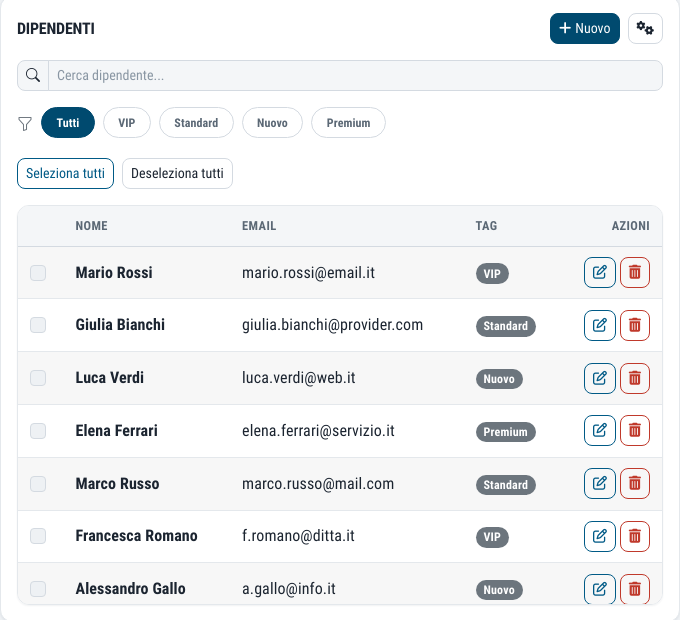
What you get
A single directory
Employees and suppliers entered by hand or imported from CSV, including the export from TeamSystem, the Italian payroll software.
One document for each person
Choose the template and the recipients: the platform produces one document for each person or supplier.
DOCX or PDF
A single ZIP archive, with editable documents or documents ready to print and sign.
Core documentation
A package of core privacy documentation, downloadable from the same page.
From the directory to an archive of documents in three steps
Prepare the directory
Enter employees and suppliers by hand, or import them with the downloadable CSV templates. If you use TeamSystem, there is a template designed for its export.
Choose template and people
Select the document template and the people or suppliers to apply it to, all of them at once if you wish.
Download the ZIP
Each document is filled in with the person's details and your company's: company name, VAT number, contact person, certified email address (PEC), date.
Typical uses of the privacy forms
The templates cover the documents that the GDPR requires you to produce for each person or supplier. They are the ones most often missing, or never updated since someone's first day, when an inspection comes along.
When an employee joins the company or changes role, you generate their appointment in a minute instead of hunting for the last file used and editing it by hand.
- Appointments of persons authorised to process data
- Instructions to authorised persons
- Authorisation letters
- Privacy notices
- Appointments of external processors
Documents that remain yours
The DOCX format is editable: if a particular case needs an extra clause, you add it to the generated document without having to redo everything. PDF is for when you want a locked document, ready for signature.
The generated documents sit alongside the records of processing: the register says which processing activities exist, the forms document who is authorised to carry them out and with what instructions.
Suppliers and the supply chain. The same supplier directory is used for the appointments of external processors. To assess their security as well, there is the questionnaire in the Supply Chain module.
Questions about the GDPR forms
What details are entered in the documents?
The details of the person chosen from the directory and those of your company, such as company name, VAT number, contact person, certified email address (PEC) and date. The platform puts them in place of the template's placeholders.
Can I import employees from the payroll system?
Yes, from a CSV file. Import templates for employees and suppliers can be downloaded, plus a template designed for the export from TeamSystem.
Are the generated documents already signed?
No. You receive the completed documents, as editable DOCX or as PDF, ready for each recipient to sign.
Which standards it supports
Appointments, instructions and privacy notices are direct GDPR requirements, and they also document how data protection is organised for the ISO standards.
Often activated together
Records of processing
The GDPR Article 30 register, with processing activities suggested by an analysis of your Drive.
Learn more GovernTraining
E-learning for your staff, with a record of completed courses ready to show.
Learn more GovernSupply Chain
Supplier assessment with questionnaires completed from a link, no accounts needed.
Learn moreDo you know what someone looking for a target can see of your company?
In a demo on your real systems we show you what is exposed, how much it matters and where to start. Then, if you need it, a tailored proposal.