Web application vulnerability assessment
Websites and web applications analysed with several tools, from code vulnerabilities to cookies. From the outside, with nothing to install.
Your website is exposed to everyone, and often nobody looks after it
The company website, the customer portal, the online business application: they are often the only parts of the company anyone can reach, and also the ones nobody deals with any more once they have gone live. Because they are always accessible, they are one of cyber criminals' favourite ways in, with damage that affects not only data but also reputation.
And the risk does not lie only in out-of-date versions. Custom-built applications can have vulnerabilities inherent in the code, which no vendor update will ever fix on its own.
The web application scan is one of the six checks in the Vulnerability Assessment and combines several tools, because no single one sees everything.
What you need to set up. Nothing to install: the scan starts from Dottor Box systems on the internet. You just list the websites and applications in the Attack Surface. The addresses the websites run on are checked by the external network scan.
What you get
Several scanners, one report
General vulnerabilities, specific checks for WordPress and Joomla, security headers, presence of a WAF.
The GDPR side of the website
Cookie analysis and an on-page check for the privacy notice and VAT number, not just the technical side.
Website preview
A screenshot of each website, so you recognise at a glance what you are looking at.
False positives only once
A discarded finding does not come back in later scans.
More than 6,500 checks on web applications
The database of checks is continuously updated. These are the categories stated in the service specification.
- Exposed services and analysis of HTTP and HTTPS responses
- Identification of platforms and versions (fingerprinting)
- Vulnerabilities in the most widely used CMSs
- SQL injection in the application's queries
- Specific checks on web servers such as IIS and Apache
- Exploration of DNS records
- Default credentials never changed
- Exposed configuration files containing logins or tokens
- Directory listings that reveal confidential files
- Input fuzzing and automated browsing scenarios
- Exposed administration panels
- Vulnerabilities listed in the CVE catalogue
- Misconfigurations and takeover of services and platforms
- Static API tokens and API endpoints
From the scan to the detail of every website
List your websites
You specify the addresses of the websites and applications to check.
The tools start
Each tool runs its checks and the results are brought together in a single report, with CVSS severity and descriptions in Italian and English.
Read the results
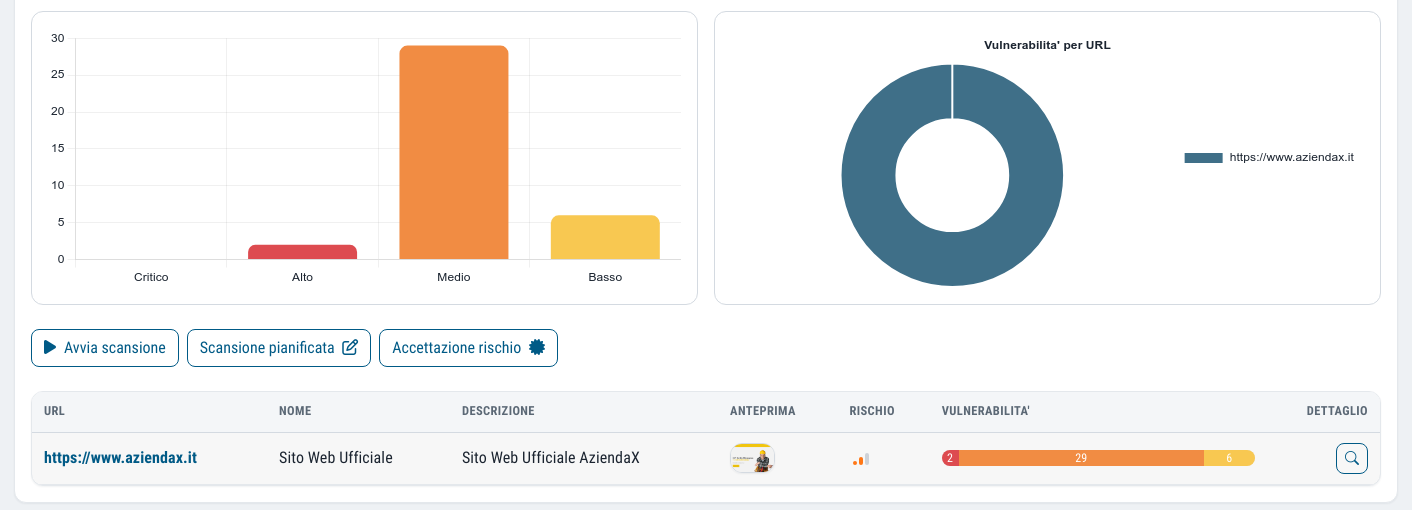
You see the websites with their preview, charts by severity band, progress and the detail of the findings site by site.
Receive what is new
At every round we compare with the previous scan and let you know by email what is new.
The frequency is configurable, and the contractual service level is the minimum commitment; you can always start a scan straight away, for example after releasing a new version of the website.
False positives do not come back
An automated scanner makes mistakes, and on websites it makes them often. What makes the difference is what happens next. In Dottor Box an administrator can discard a finding identified as a false positive: from then on it does not reappear in later scans, either in the current view or in the archive.
This keeps the report credible, and you do not have to reread the same false alarms at every round. In addition, scans are complemented by manual checks by qualified staff.
Vulnerability assessment or penetration test?
A vulnerability assessment identifies possible vulnerabilities. A penetration test simulates ethical attacks to check how well the application really holds up. For the most critical websites, or for custom-built applications, the Dottor Box report recommends also carrying out a Web Application Penetration Test.
Which standards it supports
Web applications often process personal data: checking them regularly is a technical measure you can document.
Frequently asked questions about web application vulnerability assessment
Can the scan slow the website down or take it offline?
Scans are non-invasive, but they still send a lot of requests, as an automated visitor would. If the website runs on very limited resources it is best to schedule them at times of low traffic, and the scheduler allows this. A web application firewall or anti-bot system may filter some of the requests: the scan detects whether one is present, and this should be borne in mind when reading the results.
Does the check work with WordPress and Joomla?
Yes. As well as general checks, the scan uses tools specific to WordPress and Joomla. On other widely used CMSs, platform and version identification and the search for vulnerabilities listed in the CVE catalogue do the work.
Does the scan check whether the website complies with the GDPR?
It checks some concrete elements: the cookies set by the website, the presence on the page of the privacy notice and VAT number, and the security headers. They are useful indicators, but whether the website complies with the GDPR remains a legal assessment, which also covers legal bases and consent management.
How often should a website be scanned?
Every time it changes and regularly in any case, because new vulnerabilities in CMSs, plugins and libraries are published all the time. At the Security Monitor level the contract provides for a weekly scan of one web application; after an update or a release you can run an extra one.
Does the vulnerability assessment also find mistakes in custom-written code?
In part. The automated checks identify many classes of development errors, such as SQL injection, exposed configuration files, reachable administration panels and static API tokens. An in-depth check of the application logic, on the other hand, requires a penetration test, which you can request as consulting. The difference is explained in the guide vulnerability assessment or penetration test.
Often activated together
Vulnerability Assessment
Six checks from inside and outside, with CVSS severity, history and alerts on what is new.
Learn more SeeExternal network
Your perimeter as seen from the internet: ports, exposed services and blacklists, with nothing to install.
Learn more ProveSpecialist consulting
A Dottor Marc specialist by appointment, booked directly from the dashboard.
Learn moreDo you know what someone looking for a target can see of your company?
In a demo on your real systems we show you what is exposed, how much it matters and where to start. Then, if you need it, a tailored proposal.