Cyber Screening
In a few minutes, what anyone looking at you from the internet can see, and how attractive you are as a target. You get the Cyber Screening by creating your Dottor Box.
Your company as seen by someone looking for a target
Before deciding what to protect, you need to know what is exposed. The Cyber Screening looks at your company from the outside, as someone scouring the internet for an easy target would: public addresses, reachable services, forgotten domain names, passwords that have already ended up in a data breach.
The result is a readable picture and a summary risk score: a measurable starting point which, in the following months, becomes the benchmark for seeing whether your exposure is going down.
The name already says what it is about: eXtra-fast Risk Analysis for Your Cyber Security. It is a quick analysis, not a full vulnerability assessment, and its purpose is precisely to show you where to start.
Registration is required. The Cyber Screening is not an anonymous scan to run against any address: it is the second step of activation, immediately after your Dottor Box is created. That way the analysis concerns your company, with your reference data, and stays available in the portal as the basis for later checks.
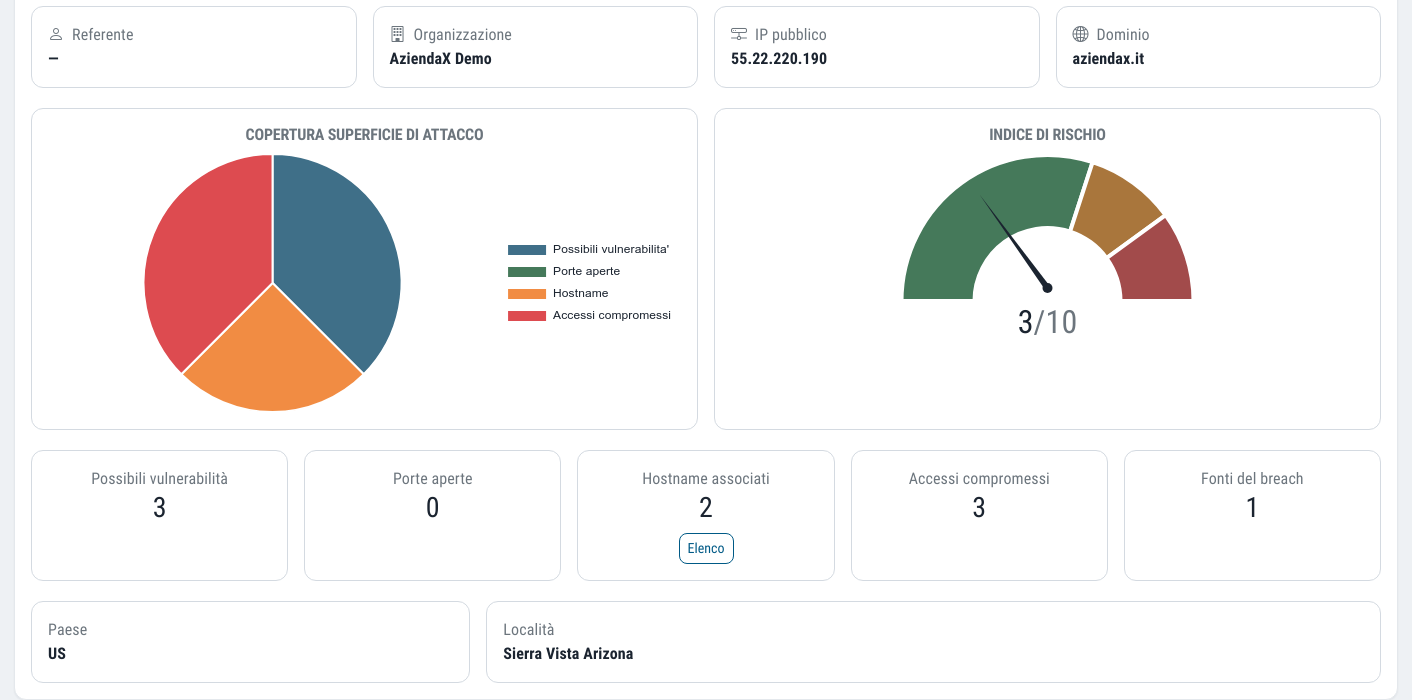
What you get from the Cyber Screening
Ports and known vulnerabilities
The services reachable on your public address and the associated known vulnerabilities, drawn from public sources.
Forgotten subdomains
The subdomains that actually exist, including those you may no longer know you have: old test environments, half-decommissioned services.
Credentials already out there
Company addresses that have appeared in data breaches, with the name of the database they come from.
A score to start from
A summary risk index, so you have a number to compare over time instead of an impression.
From the public address to the risk score
You install nothing: the Cyber Screening starts from two pieces of information you already know and queries public sources, the same ones an attacker would use.
Create your Dottor Box
You register and enter your company's public IP address and domain, together with the contact person's details.
We query public sources
Engines that catalogue open ports and known vulnerabilities on the internet, the geolocation of the address, subdomain enumeration.
We look for compromised credentials
The first time it is opened, the Cyber Screening automatically starts the search for company credentials circulating online, if it has never been done.
You read the picture
Company details, position on a map, ports, possible vulnerabilities, subdomains, credentials and the chart of the exposed surface.
How the risk index is calculated
The Cyber Screening score is a weighted average: known vulnerabilities count far more than open ports, because an open port is a possible way in, while a known vulnerability is a documented way in.
- Known vulnerabilities weigh more than services that are merely exposed
- The score has a minimum value even when nothing turns up
- The calculation is the same every time it is opened, so values can be compared over time
A clean result does not mean there is no risk: it means that from the outside, using public sources, nothing obvious can be seen. That is why the score never goes down to zero.
The Cyber Screening principle
It is a deliberate detail we get right: a quick analysis from public sources cannot certify that there are no problems, and the number should not suggest it can. To know what is really behind the perimeter you need vulnerability assessment and a register of your attack surface.
From the Cyber Screening to continuous monitoring
The Cyber Screening is a quick snapshot. What it finds becomes the basis for Dottor Box's continuous checks.
- The subdomains found are registered in the Attack Surface, so they are included in the scans
- Public addresses move on to the external network check, with ports and blacklists every day
- Compromised credentials are tracked over time with Dark Web Monitoring
- The initial score remains as the reference for measuring improvements
Which standards it supports
The Cyber Screening is the first piece of the risk identification that standards require: knowing what is exposed before deciding on measures.
Frequently asked questions about the Cyber Screening
What do I need for the Cyber Screening?
You register, create your Dottor Box and enter your company's public IP address and domain. You do not have to install anything or give access to your systems. The full path, from registration to contract, is described in how Dottor Box is activated.
Does the Cyber Screening run a vulnerability assessment on my servers?
No. The Cyber Screening is based on public sources: services that catalogue open ports and known vulnerabilities on the internet, address geolocation, subdomains and archives of breached credentials. Actual testing of your addresses is the job of the external network vulnerability assessment.
Does a low score mean the company is safe?
No. The score measures what anyone can see of you from the internet through public sources. The internal network, workstations and website code remain outside its view. It should be read as a starting point, not as a certificate.
Can I repeat the Cyber Screening over time?
Yes. The picture is recalculated with the same method, so values remain comparable from one month to the next. Responses from external sources are kept for one hour: if you open it several times in a row, you see the same result.
What are the compromised credentials shown by the Cyber Screening?
They are company email addresses that have appeared in data breaches, usually of external services a member of staff had signed up to. For each one you see the database it comes from. It does not necessarily mean your company has been attacked, but that password must be changed wherever it has been used. To track them over time there is Dark Web Monitoring.
After the Cyber Screening
Attack Surface
A reasoned register of the networks, addresses, applications and domains to protect, with how critical each one is.
Learn more SeeVulnerability Assessment
Six checks from inside and outside, with CVSS severity, history and alerts on what is new.
Learn more SeeDark Web Monitoring
Compromised company credentials and mentions of your brand on leak and ransomware sites.
Learn moreCreate your Dottor Box and start the Cyber Screening
The Cyber Screening is the second step after registration: you create your Dottor Box, enter your public address and domain, and get the first picture of your exposure.