Cyber Drill, the probe that looks at your network from the inside
A virtual machine or a small device on site that runs the internal network scans. It does not ask you to open any port on the firewall.
To know a network you have to be inside it
From the internet you see only the perimeter. Printers, NAS devices, forgotten servers and shared folders with overly broad permissions can only be seen from the inside. The Cyber Drill is the probe that does this work: installed in your network, it runs the scans that the portal then shows you.
It is what makes possible the internal network vulnerability assessment, the open shares check and the network map from which the inventory discovers the machines nobody had recorded.
You install it as a virtual machine on your hypervisor, or you receive it ready to go as a physical device. You paste in the licence code, and from then on it works to the scan schedule you have chosen.
The connection always goes from the probe to the portal, never the other way round. That is why you do not need to open any inbound port on your firewall.
What you get
Virtual or physical
A virtual machine for VMware vSphere, Proxmox or Hyper-V, or a mini PC supplied by us.
Firewall stays closed
No inbound rules to configure: it is the probe that calls the portal.
Automatic tunnel
The secure channel configures itself from the licence code. Your IT team does not have to prepare anything.
Always under control
It updates itself and the dashboard tells you at any moment whether it is active.
From the virtual image to the first scan
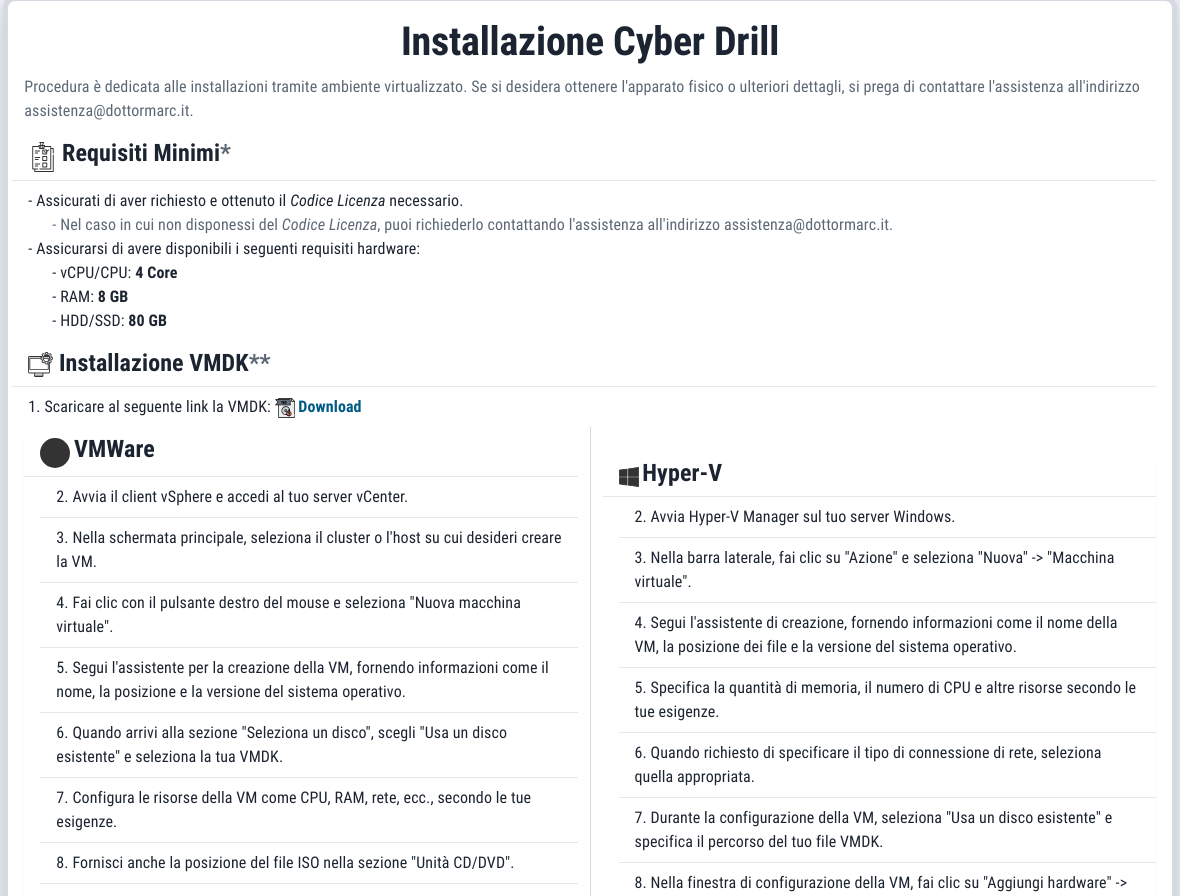
The installation page in the portal contains everything you need, including your licence code already printed and ready to paste.
Download the image
From the portal you download the virtual machine and follow the instructions specific to your hypervisor: VMware/vSphere, Proxmox or Hyper-V.
First login
You log in with the initial credentials, which you must change straight away: the change is mandatory.
Paste the licence
With the licence code the probe obtains its own VPN configuration and connects to the portal.
The schedule starts
Scans start according to your schedule: configurable frequency, with the contractual service level as the minimum commitment.
What you need to prepare
A few requirements, checked together with you before activation. If you do not have a virtualised environment, the probe arrives as a mini PC supplied by Dottor Marc.
- A virtual machine with at least 4 vCPUs, 8 GB of RAM and 80 GB of disk
- Supported hypervisors: VMware vSphere, Proxmox, Microsoft Hyper-V
- No inbound ports to open on the firewall
| Network requirement | Minimum threshold |
|---|---|
| Upload bandwidth per workstation | 500 Kbps |
| Contracted bandwidth | 10 Mbps download, 2 Mbps upload |
| Minimum assured bandwidth | 1 Mbps download, 1 Mbps upload |
| LAN cabling | Structured, at least Category 5E certified at 100 MHz, reaching every workstation to be analysed |
Polling, not commanding
Most remote probes wait for orders on an open port. The Cyber Drill does the opposite: it calls the portal, picks up the queued command and runs it. From outside there is nothing listening to reach.
Commands travel encrypted with a key specific to your company, and scan results are transmitted in encrypted form over a secure channel. The same connection updates the "heartbeat" that tells you on the dashboard whether the probe is alive: if it stops, you notice.
Automatic updates, with nothing wasted
The probe sends the fingerprint of its own software and receives the new version only if it is different. No unnecessary downloads, no work for your IT team. The portal always knows which version is running on site.
Remotely we can trigger the commands needed for management: vulnerability scan, open shares, network map, speed test, reconfiguration, update, restart and tunnel management.
Which standards it supports
Internal network scans are the basis of the evidence on vulnerability management and on the device inventory.
Frequently asked questions about the Cyber Drill probe
Does the Cyber Drill need to reach every network in the company?
It needs to reach all the network segments defined in the Attack Surface: the networks, VLANs and subnets you want to analyse. If routing or an internal firewall prevents the probe from reaching a segment, that segment stays out of the scans. We check this together during activation; after that, segments, schedule and exclusions are managed from the dashboard.
Does the Cyber Drill require ports to be opened on the firewall?
No. The probe only needs to be able to go out to the internet to reach the portal: it is the probe that opens the encrypted connection and picks up the queued commands. No listening service is exposed outside your network.
What do I do if I do not have a virtualised environment?
In that case Dottor Marc supplies the probe ready to go on a mini PC, to be connected to the network. If you do have VMware vSphere, Proxmox or Hyper-V, a virtual machine with 4 vCPUs, 8 GB of RAM and 80 GB of disk is enough.
What does the Cyber Drill check inside the network?
It runs the internal network vulnerability assessment on PCs, servers, switches, printers and IoT devices, looks for shared folders with overly broad permissions and draws the network map that brings unrecorded devices to light. It is not needed for public addresses and websites: the external scanner works on those.
Can the probe's scans disrupt the network?
Scans are non-invasive and start at the times in the schedule you choose. IP addresses, ports or MAC addresses of sensitive devices can be excluded, and the exclusions stay in force for later scans. Bandwidth and cabling requirements are checked together before activation.
What happens if the probe is switched off or loses its connection?
You see it on the dashboard, where the probe status is updated at every connection. In addition, a daily check alerts Dottor Marc to environments whose scans have not run for too long, so a stopped probe does not go unnoticed.
Where does the data collected by the probe go?
The results travel encrypted to Dottor Marc's servers and flow into your Dottor Box, which has a dedicated database schema, separate from those of other customers. The platform runs on Google cloud infrastructure and Dottor Marc's own data centres. Platform security and compliance.
Often activated together
Internal network
Your LAN scanned by the on-site probe, the way malware that is already inside would see it.
Learn more SeeOpen shares
Network folders that the wrong people can read or write: ransomware's favourite route.
Learn more SeeAsset Management
A single IT inventory of devices and software, with a graph map of the network.
Learn moreDo you know what someone looking for a target can see of your company?
In a demo on your real systems we show you what is exposed, how much it matters and where to start. Then, if you need it, a tailored proposal.